
It’s 8:30 on a Monday morning. The warehouse is ready to dispatch its first truck. Finance is closing the month. Someone asks IT, “When SAP support ends, will we still be able to create invoices?”
Yes, your SAP ECC system can keep running when mainstream maintenance ends. The harder question is what happens when you need a fix, a legal update or help with an integration your business depends on. The answer starts with the exact version you run and the support terms you have in writing.
When does SAP ECC mainstream maintenance end?
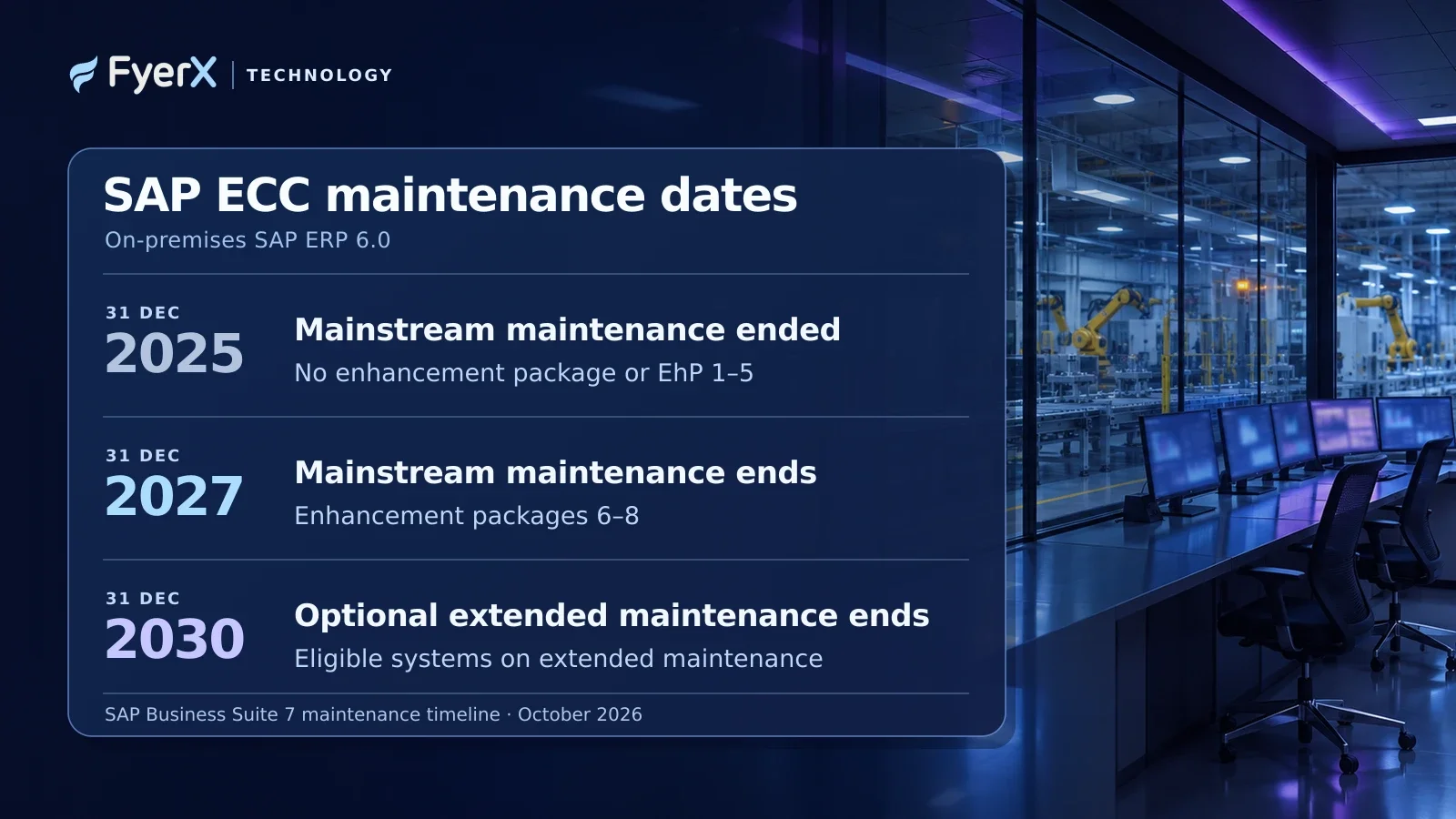
For SAP ERP 6.0 with Enhancement Packages 6, 7 or 8, SAP’s scheduled end of mainstream maintenance is 31 December 2027. For eligible systems, SAP offers optional extended maintenance from 2028 through 31 December 2030. If you run SAP ERP 6.0 without an enhancement package or with Enhancement Packages 1–5, mainstream maintenance already ended on 31 December 2025. Check your product version, add-ons and contract before putting any of these dates into your project plan. SAP Business Suite 7 maintenance strategy · SAP’s version-by-version maintenance timeline
For its on-premises extended maintenance offering, SAP lists a premium of two percentage points on the maintenance basis for the covered scope. Ask SAP for a written quote and a list of the systems and components it covers. Use both when you compare the cost of buying time with the cost of accelerating the migration. SAP’s maintenance terms
What happens if you keep running SAP ECC after 2027?
SAP says customers who skip extended maintenance, or reach the end of it, move into customer-specific maintenance. The system can continue processing orders, stock movements and invoices. The change is in support coverage. SAP says that without proactive measures after mainstream maintenance ends, an affected ERP solution will stop receiving further legal updates and support packages. Confirm with SAP which fixes, patches and updates are available for your specific products and agreement. SAP’s maintenance strategy · SAP’s guidance on legal updates and support packages
Imagine an Indian manufacturer uses ECC to create invoices, send data to its e-invoicing integration and record the Invoice Reference Number against the original invoice. A change to an interface or a reporting requirement can involve the finance team, the integration owner and the vendor who maintains the connector. Ask each one how a change would be handled under the support arrangement you’ll have in 2028. If the response is “IT will sort it out,” put a named owner and a test case against it now. SAP’s documentation on Invoice Reference Numbers for GST India
Can some SAP customers stay on ERP until 2033?
SAP has described a separate, time-limited SAP ERP, private edition transition option for qualifying customers who need additional time from 2031 through 2033. It requires a move to SAP ERP, private edition on SAP HANA by the end of 2030 and has additional eligibility requirements. SAP’s October 2026 guidance also says that after 2030, affected third-party databases and certain Java dependencies face support limitations. It says conversion tooling from Business Suite 7 on the affected third-party databases is available only through the end of 2030. If your team relies on a brownfield conversion, check that constraint early. SAP’s October 2026 guidance on planning beyond 2030
SAP ECC to S/4HANA. Which migration route fits your business?
A 2026 SAPinsider survey of 296 community members found that 36% were implementing S/4HANA, running a pilot or evaluating the business case. The figure reflects that survey group. If you’re still deciding how to move, start with what the business needs to retain and what it wants to change. SAPinsider ERP Migration and Transformation 2026
Brownfield, or system conversion. Convert the existing ERP system and carry forward much of its configuration and history, with changes where S/4HANA requires them. Consider this if core processes work well and continuity matters. Budget time to review custom ABAP code, add-ons and integrations.
Greenfield, or new implementation. Start in a new system, design the processes you want and migrate the data you need. Consider it if long-running workarounds or different ways of working across sites are holding the business back. Plan for process change, data migration and training.
Selective data transition. Move an agreed slice of data and retain or redesign selected processes. A group consolidating several ECC systems might keep active company codes while leaving older history in a system it can still access for audit. Define what stays accessible and how before committing to this route.
SAP treats the migration route and target deployment as separate decisions. For example, SAP S/4HANA Cloud Public Edition uses a new implementation approach. If someone proposes a brownfield conversion, confirm the target edition supports it before comparing scope or price. SAP’s guide to S/4HANA transition paths
What to do before you commit to a go-live date
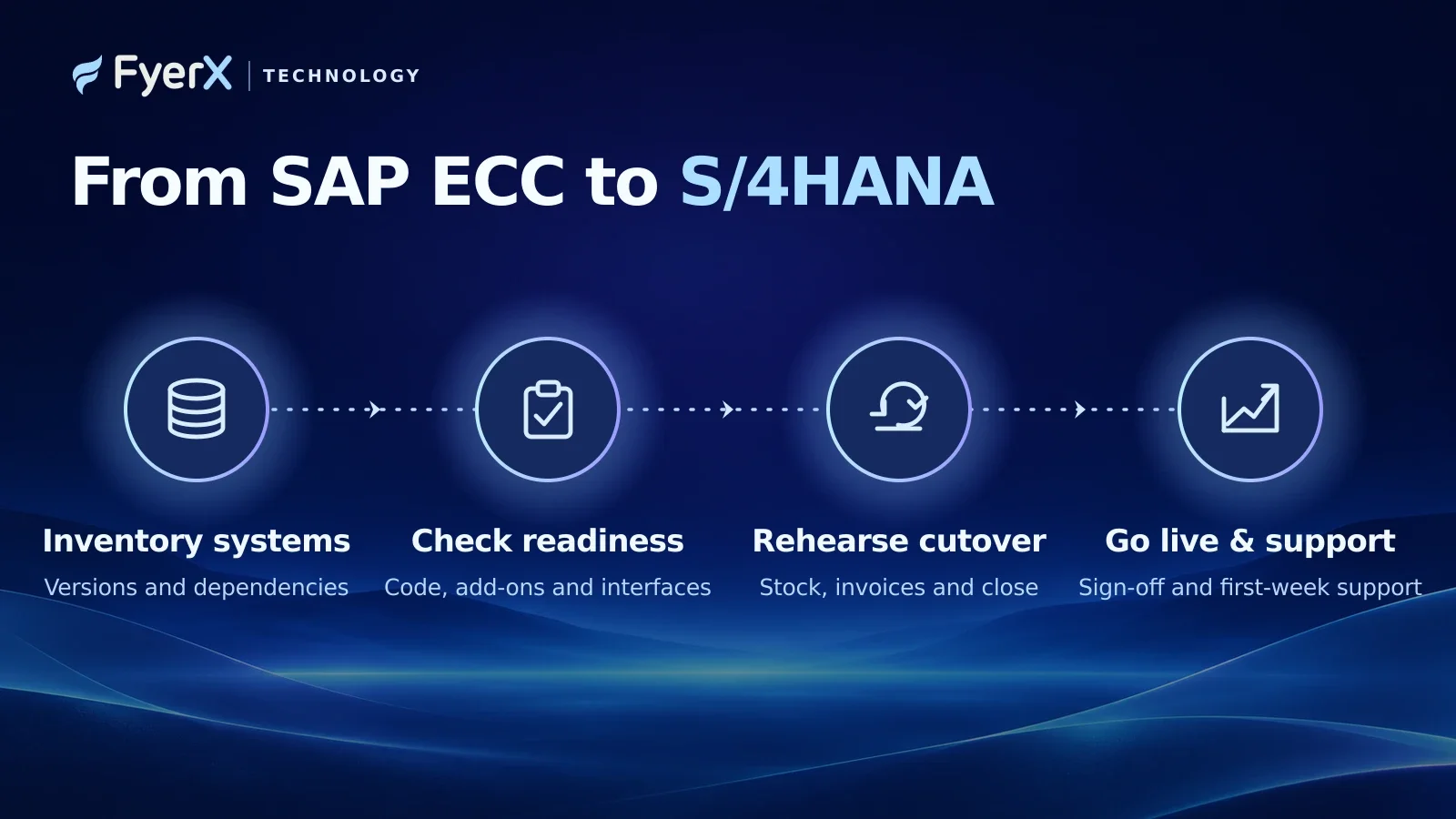
1. Inventory the systems that keep the business running. Record the ECC enhancement package, database, add-ons, integrations and custom programs. Add an owner and business impact for each dependency. A warehouse printer interface can matter as much to dispatch as the ERP system itself.
2. Run SAP Readiness Check and turn the findings into work. For a conversion, the assessment helps surface changes in S/4HANA, custom code considerations and add-on compatibility. For each significant finding, record the affected process, its owner and what you need to test. A list of technical findings is only useful if the people running those processes can act on it. SAP Readiness Check guidance · SAP conversion guide
3. Rehearse the transactions that would hurt if they failed. Take a real business example, such as an open purchase order where goods have been received and the supplier invoice hasn’t been posted. Verify that the receiving and finance teams can complete the transaction after cutover, with the correct quantities and balances. Test stock reconciliation, GST-related integrations where applicable, and period-end posting. Time the rehearsal and decide who can stop the cutover if a critical check fails.
4. Set the cutover window and the first-week support plan. Work around month-end close, peak dispatch days and planned plant downtime. Agree on the point at which you would pause or roll back, who signs off on financial balances, and who takes calls when the first live transaction fails.
If the first rehearsal runs beyond the downtime the business can afford, find out what took the time. Reconciling stock records calls for a different fix than waiting for a data load or getting sign-off from a plant that has already closed for the day. Give each bottleneck an owner and test the revised plan before announcing a new date.
What should you do about the 2027 deadline now?
This week, get three things on one page. Write down the support end date for your current system, the S/4HANA route you’re evaluating and the business process you’ll test first. Assign an owner to each. If you need extended maintenance, agree what you’ll finish during the extra time, whether that’s cleaning master data, fixing interfaces or rehearsing the cutover.
Come back to the warehouse on that Monday morning. The measure of a successful migration is whether the team can dispatch the truck, finance can see the right posting, and someone can explain what happened if either fails.
Planning your move from ECC? Explore FyerX SAP consulting and implementation services.
Looking for technology support?
Tell us what you need to build, improve, or manage.
Talk to FyerX Technology